
If attempting to import scans in DCM or STL format for a specific case that needs to be resent, please follow the steps described below:
Step 1: Create a new patient.
Step 2: Create a new case.
Step 3: Select the laboratory to which you want to send the information.
Step 4: Once you are in the "Order Form" of the case, select the option on the right side of the screen, "Import Scan".
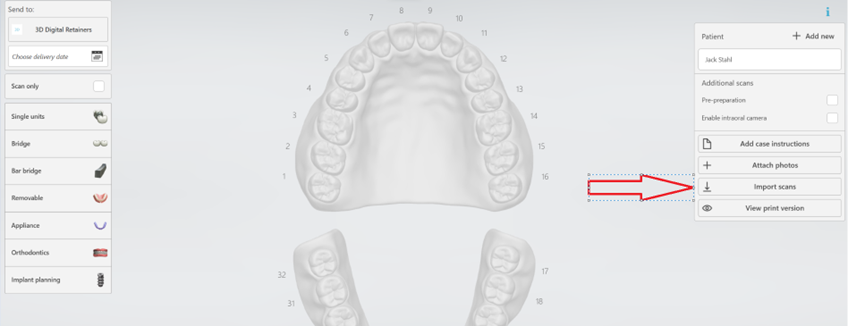
Step 5: Browse to the location where you saved the scans, and you will be able to import the Upper, Lower, and Bite in STL or DCM format only.
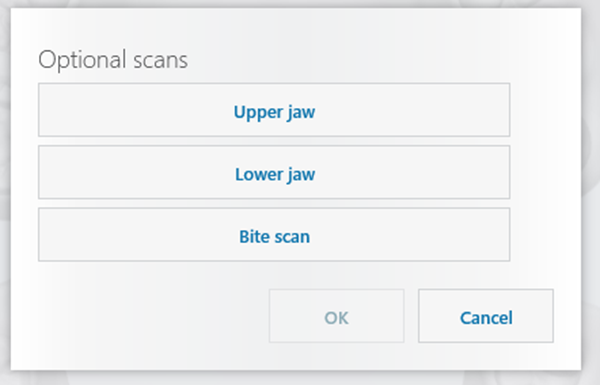
After following the steps above, the case will be ready to be sent.
If you have any questions, our Customer Support team is here to help!
Email: designservices@3shape.com
Phone: +1 602-688-4133
Live Chat: Available Monday – Friday, 7:00 AM – 3:00 PM (MST)
International Support: +44 159-572-8586, Monday – Friday, 9:00 AM – 6:00 PM (CET)
We’re happy to assist you with any questions or concerns!